Quick Links Admin Mode
CASE STUDY
Problem
Josh Hoffert
UX Designer
Research
4.2 Editing a Quick Link
The edit flow mirrors the creation flow, but with pre‑populated values. Admins can:
• Update text fields
• Change role relevance
• Toggle recommended status
• Activate or deactivate the link
The success/error modal reinforces confidence and reduces ambiguity.
4.3 Card States
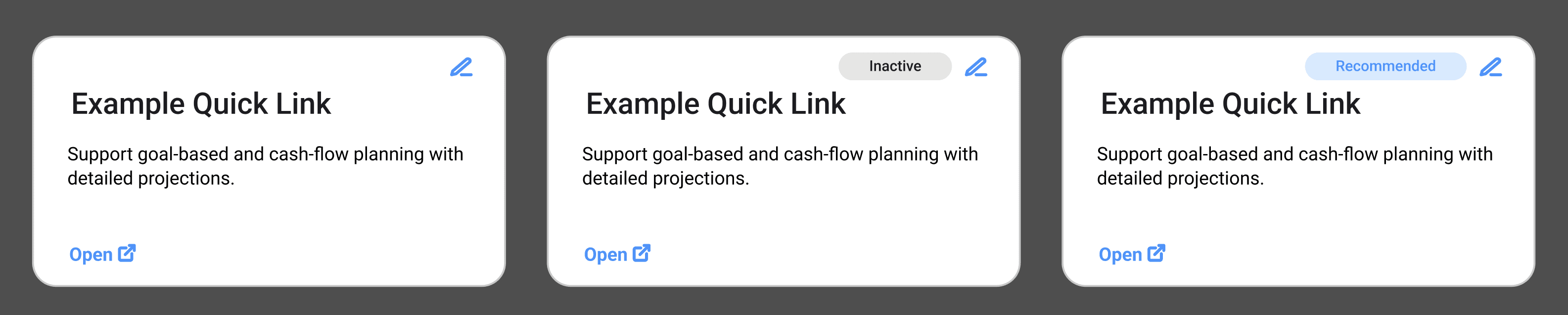
Admin Mode includes previews of three card types:
• Default
• Inactive (visually muted)
• Recommended (badge/lozenge)
These previews help admins understand how their changes will appear to advisors..
Impact
• A way to mark links as recommended
Quick Links were hard‑coded and required costly developer support to update
Admins had no interface for creating or editing Quick Links
Inactive links couldn’t be staged safely
Recommended links and roles couldn’t be surfaced easily
6 Admins (stakeholders)
FEATURE PROCESS
1 Kickoff Meeting
3 Reviews
• wireframes
• medium fidelity mocks
• high fidelity mocks
• dev ready
Errors discovered after deployment were slowly and expensive to fix
The Quick Links page was useful for advisors but painful for admins.
Before Admin Mode:
Because the admin team was small, I was able to interview every stakeholder directly. Their needs were clear and consistent:
Admins needed:
• A simple form for creating and editing Quick Links
• Required fields that were obvious and validated
• Role selection via checkboxes
• A way to mark links as recommended
• A safe inactive state for staging
• No developer dependency
• No backend access
• Clear success and error feedback
These interviews gave me a crisp set of MVP requirements and a clear path forward.
Solution: Quick Links Admin Mode
Admin Mode introduced a dedicated interface for maintaining Quick Links. It included two core workflows: creating and editing Quick Links. The final visual design is shown in the PDF you provided, arranged into two horizontal user flows.
4.1 Creating a Quick Link
The creation flow guides admins through all required fields:
• Name
• Description
• URL
• Role checkboxes
• Active / Inactive radio buttons
Recommended toggle
Inactive is the default state, allowing admins to stage new links safely before making them visible to advisors.
Admins receive immediate feedback through a modal that displays:
• Required field errors
• Confirmation of successful creation
This ensures clarity and prevents accidental misconfiguration.

Operational Efficiency
Reduced engineering overhead
Faster turnaround for updates
More consistent Quick Links taxonomy
Better governance and control
Admin Experience
No backend access required
No developer dependency
Faster updates
Clear validation and error handling
Safe staging via inactive state
Advisor Experience
More relevant Quick Links
Cleaner filtering by role
Recommended links highlight important tools
Faster access to operational systems
